
You can picture the finished extension. A case officer, a neighbour, and sometimes a planning committee cannot, because all they have in front of them is a set of flat elevations and a block plan. That gap between what you intend and what a non-technical reader can imagine is where objections start.
Why a planning officer reads a 3D visual differently to a flat elevation
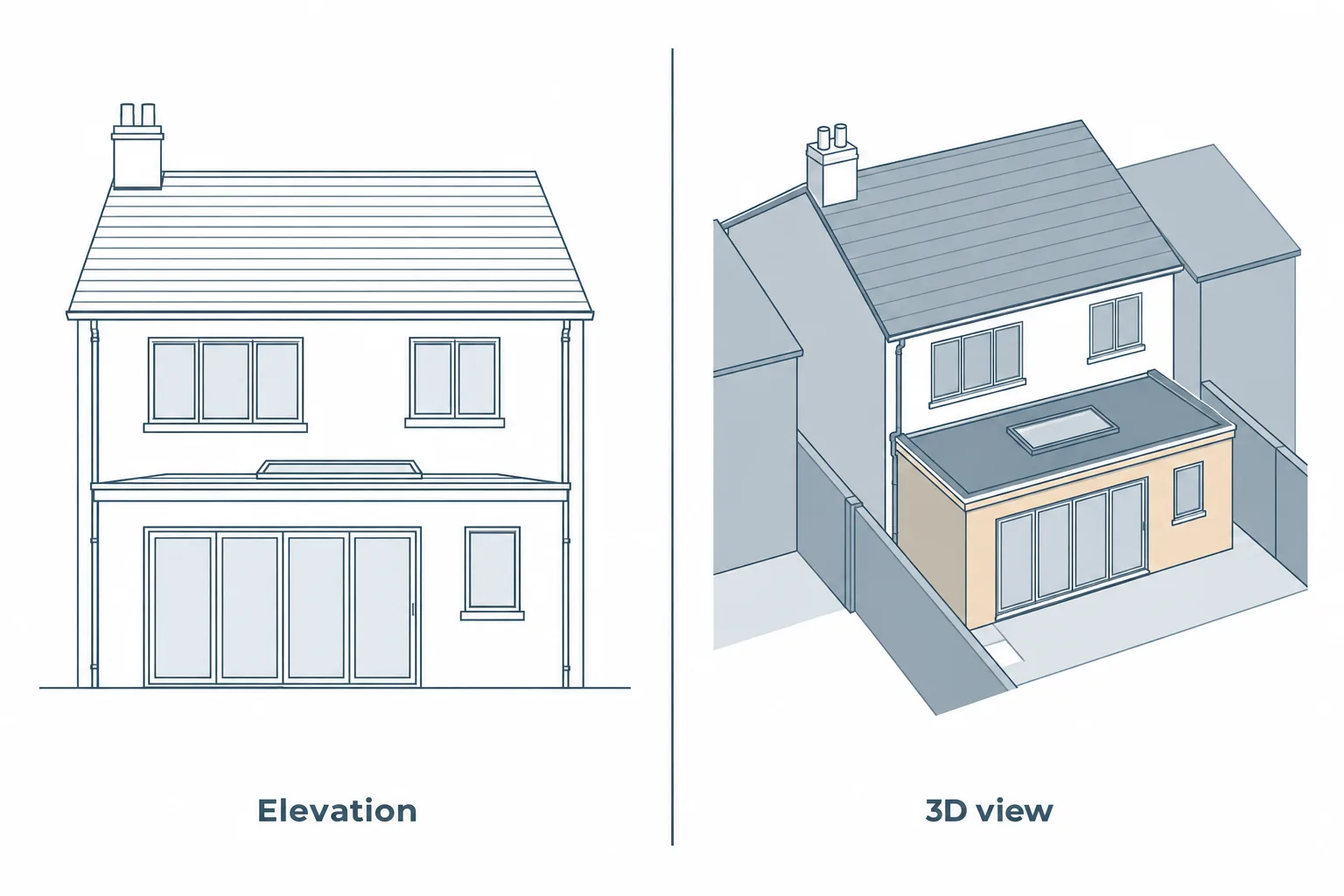
Elevations are accurate, but they flatten depth, roof geometry, how a new gable sits against the one next door, and how a zinc finish reads against brick in daylight.
A 3d visualisation for planning application purposes turns that drawing set into something a general audience can judge on sight, making the proposed design easier to assess in its real surroundings.
Officers assess proposals against impact on the character of the area, the streetscene, and neighbouring amenity. Those are visual, contextual judgements. A good visual answers them directly instead of leaving the officer to imagine an answer.
Related reading3D Visualisations in Storrington: Transforming Your Architectural Vision – ArchEvolveRead the guide →Visuals support an application; they do not decide it. No image guarantees consent, and nobody who produces them can promise you an approval.
When visuals are required, when they are expected, and when they simply help
There are two layers to what you must submit. National requirements apply everywhere, and on top of those, each authority sets its own local validation requirements listing what must accompany every application in its area. Read your council’s checklist before you commission anything.
Before commissioning a 3d visualisation for planning application submission, check whether your local authority requires specific viewpoints, supporting documents or verified images.
For a straightforward householder extension, CGI is rarely mandated. Expectations rise when the scheme is larger, more prominent, or more contested: conservation areas, the setting of listed buildings, sites on the edge of National Parks and National Landscapes, corner plots, and anything visible from a well-used public vantage point.
Visuals usually live inside a supporting document rather than standing alone. A Design and Access Statement is one natural home, and it is required for major development, listed building applications, and certain development in conservation areas and World Heritage Sites above set thresholds.
Heritage statements are another. Subject to your local authority and site specifics, pre-application advice is typically the cheapest way to find out exactly what yours expects.
The types of planning visualisation, and which one your application needs
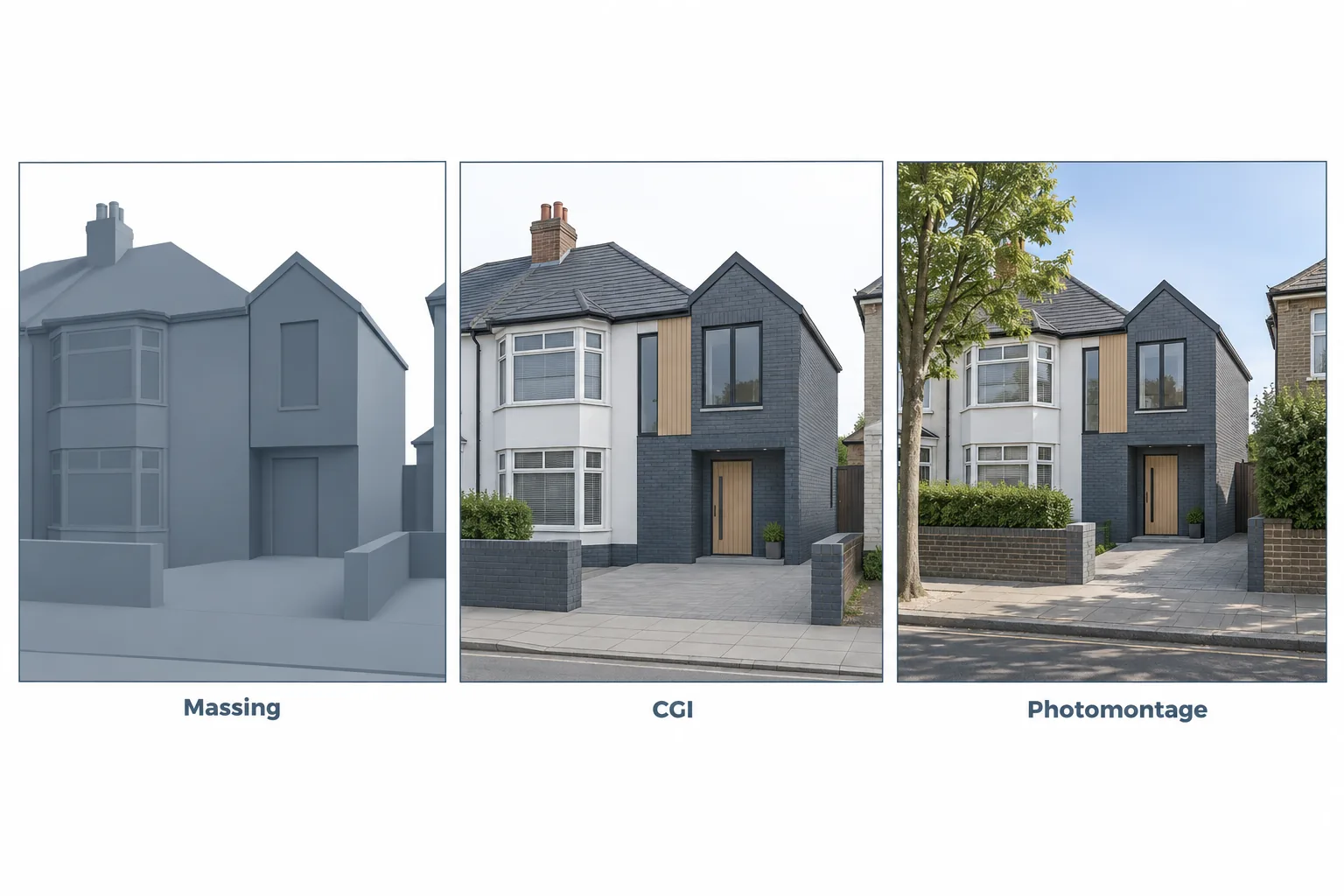
Match the output to the planning question being asked, not to what looks best in a brochure.
| Visualisation type | Main purpose | Best suited to |
|---|---|---|
| 3D massing model | Shows building height, bulk and roof shape | Assessing scale, overbearing impact and separation distances |
| Photorealistic CGI render | Illustrates materials, glazing and the proposed finish | Explaining design quality and helping stakeholders understand the proposal |
| Photomontage | Places the proposed building into an existing photograph | Showing how an extension or new building may look within its surroundings |
| Verified view (AVR) | Presents a view produced using a documented, survey-based methodology | Schemes where visual impact needs to be assessed more rigorously |
| Daylight and shadow study | Illustrates how a proposal may affect sunlight and shadows | Sites where neighbouring amenity or garden sunlight is a concern |
| Animation or fly-through | Shows the proposal from multiple viewpoints or as a moving sequence | Larger or more complex schemes where static images may not explain the design sufficiently |
3D massing models and block studies
Untextured volumes showing height, bulk, roof form and separation distances. Fast, inexpensive, and often the most persuasive thing you can put in front of an officer at pre-application stage, because they answer overbearing and overshadowing concerns without the distraction of finishes.
Photorealistic CGI renders
Materials, glazing, landscaping and light shown as built. These carry the design quality argument and tend to defuse neighbour consultation, because people object less to what they can actually see. Interior visuals rarely carry planning weight, but they help you make decisions before the drawings are frozen.
Photomontages and streetscene context views
The proposal composited into a real photograph taken from a public vantage point, sitting alongside the existing neighbours, roofline rhythm and boundary treatments. If a montage is illustrative rather than survey-verified, say so on the sheet.
Verified views and AVRs
A verified view is built from surveyed camera positions with recorded coordinates, camera height and focal length, so the image can be independently checked by a third party.
Accuracy levels run from a simple wireline outline through to a fully rendered image in context, and where one is requested, the authority will normally specify the level it wants. The methodology note explaining how the view was produced matters as much as the image itself.
Daylight, sunlight and shadow studies
When the objection is loss of light, shadow path diagrams are often the single most useful output you can produce. Established UK guidance works to fixed reference dates, with sunlight to gardens assessed using the hours received on 21 March as a representative average for the year.
A quick sun study is not the same thing as a formal daylight and sunlight assessment, so be clear which you are commissioning.
Animations and fly-throughs
Occasionally worth it for larger or committee-determined schemes. Check how the submission portal handles the file before you spend the money, and put accuracy ahead of motion every time.
What makes a visualisation LPA-ready rather than just attractive
The difference is discipline, not render quality.
- Build the model from measured and topographical survey data, not from assumptions or photographs alone.
- Model real site boundaries, levels, mature trees and the neighbouring built form. Do not crop out the thing the officer is worried about.
- Keep materials honest and identical to the materials schedule and the submitted drawings.
- Annotate for the reader: north point, viewpoint location plan, viewpoint reference numbers, date of photography, boundary lines.
- Output as a labelled PDF at a stated sheet size so the visuals sit in the same pack the officer is already reading. The Planning Portal accepts PDF alongside common image formats such as JPG, PNG and TIF for online applications.
A well-prepared 3d visualisation for planning application package should complement the architectural drawings, with matching dimensions, materials and clearly labelled viewpoints.
| What to check | What the submission should include | Why it matters |
|---|---|---|
| Model accuracy | Measured dimensions, site levels and reliable survey information | Keeps the visualisation consistent with the actual site |
| Surrounding context | Relevant neighbouring buildings, boundaries and mature trees | Helps officers assess the proposal’s effect on its surroundings |
| Design consistency | Materials, glazing, roof forms and dimensions matching the submitted drawings | Reduces discrepancies and requests for clarification |
| Viewpoint information | Clearly identified viewpoints and a location plan | Allows readers to understand where each image is taken from |
| Image annotations | Drawing reference, revision, date and relevant labels | Makes each visualisation easier to identify and review |
| Verification methodology | Survey and camera information where verified views are required | Supports independent checking of the visual evidence |
| File format | Clearly labelled PDF sheets and compatible image files where accepted | Helps the documents fit the authority’s submission requirements |
| Scope and revisions | Agreed number of views, revision allowance and deliverables | Reduces uncertainty about what the visualisation package covers |
Consistency across the whole submission is what keeps validation queries and re-consultation away. At Archevolve, Revit 3D modelling and Enscape photorealistic rendering are included as standard, so renders come as part of the package on projects across Surrey rather than as an extra line item.
Where visualisation sits in the wider planning journey
The sequence runs: feasibility and measured survey, concept design and 3D model, pre-application, planning submission, technical drawings, building regulations, then construction support.
The planning drawings and the technical drawings come out of the same model as the renders, so changing the roof pitch once propagates everywhere instead of leaving three documents quietly disagreeing.
That is also why seeing the scheme in 3D early is worth so much. At concept stage, changes cost a conversation. After validation, they cost time and fees. On Crawley projects the renders arrive at concept stage, before drawings are finalised, which is exactly when your feedback is cheapest to act on.
Renders in protected and sensitive settings
Where a site sits near a National Park or a designated landscape, the first question an officer asks is how the proposal reads in its wider setting.
Visuals answer it directly, which is why renders for sites on the edge of protected landscapes around Hassocks show the building in context rather than in isolation. Agree viewpoints with the authority rather than choosing the flattering ones.
Five mistakes that turn a good visual into a liability
- Over-flattering renders. Glossy imagery that oversells quality invites scrutiny and undermines credibility if the built result differs.
- Viewpoints chosen to hide impact. Objectors and officers notice, and the missing view becomes the story.
- Visuals that contradict the drawings. Different glazing, different roof, different brick. The fastest route to a validation query.
- Missing context. Neighbouring buildings, boundary fences and mature trees left out of the model.
- Reusing a marketing render as a planning document, with no annotation, no viewpoint plan and no methodology note.
Commissioning: what to ask before you sign anything
Ask what survey data the model will be built from and who is supplying it. Ask whether the same practice produces your planning drawings, because a split between two providers is where inconsistencies creep in.
Pin down the number of viewpoints, the number of revisions, the output formats and sheet sizes, and whether a methodology note is included for any verified view. Insist on a fixed scope, because “a few renders” means something different to everyone.
When you review examples of previous work, look at context accuracy rather than polish.
When comparing providers of 3d visualisation for planning application services, prioritise accurate site context, a clearly defined scope and experience preparing visuals for planning submissions.
Frequently asked questions
Do I need a 3D visualisation for a householder planning application?
What format should 3D visuals be submitted in?
What is the difference between a CGI and a verified view?
Will a 3D visualisation improve my chances of approval?
Can the same visuals be used beyond planning?
Starting with a feasibility conversation
If you are weighing up whether your scheme needs visuals at all, the sensible first step is an initial conversation or a feasibility study on your specific site, which is also where you find out what your local authority is likely to ask for.
Full design, the planning application, technical drawings and construction support follow naturally once viability is established, and they are easier to get right when the 3D model has been there from the start.